
Matt-Cloud Media
In the years since I first set up Jellyfin, there have been updates and new features. One new feature was an OIDC plugin, and I knew I had to have it. The drawback here is that I need to update the library again, which means re-tagging hundreds of movies again... I don't want to update my old clunky container I set up two years ago.
Here is the OIDC plugin. The plugin has to be added to jellyfin, and then it can be configured in the GUI. This of course needs to be configured in Authelia as well.
This is the key to syncing the LDAP and OIDC.Jellyfin.Plugin.LDAP_Auth.LdapAuthenticationProviderPlugin
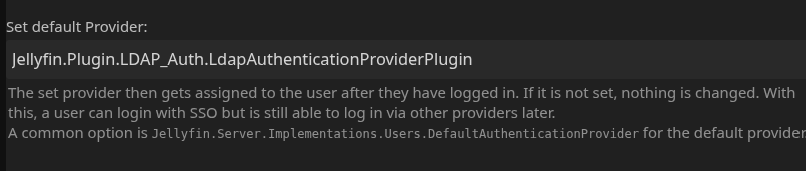
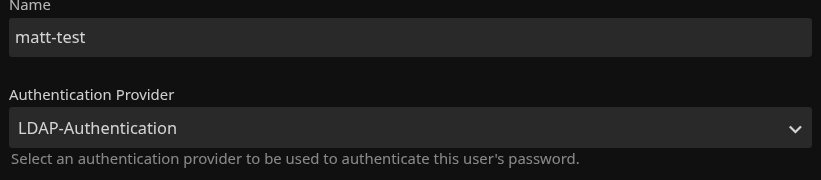
This makes new user accounts default to this option, which makes normal passwords work.
configuration.yml excerpt
      - client_id: 'jellyfin-oidc'
        client_name: 'jellyfin-oidc'
        secret: 'makeupabigoldpassword'
        public: false
        authorization_policy: 'one_factor'
        require_pkce: true
        pkce_challenge_method: 'S256'
        consent_mode: implicit
        redirect_uris:
          - 'https://media.domain.com/sso/OID/redirect/authelia
        scopes:
          - 'openid'
          - 'profile'
          - 'groups'
        response_types:
          - 'code'
        grant_types:
          - 'authorization_code'
        access_token_signed_response_alg: 'none'
        userinfo_signed_response_alg: 'none'
        token_endpoint_auth_method: 'client_secret_post'
SSO-Auth.xml
This file is located at config/data/plugins/configurations/SSO-Auth.xml when using the docker image for Jellyfin
<?xml version="1.0" encoding="utf-8"?>
<PluginConfiguration xmlns:xsi="http://www.w3.org/2001/XMLSchema-instance" xmlns:xsd="http://www.w3.org/2001/XMLSchema">
  <SamlConfigs />
  <OidConfigs>
    <item>
      <key>
        <string>authelia</string>
      </key>
      <value>
        <PluginConfiguration>
          <OidEndpoint>https://auth.domain.com</OidEndpoint>
          <OidClientId>jellyfin-oidc</OidClientId>
          <OidSecret>makeupabigoldpassword</OidSecret>
          <Enabled>true</Enabled>
          <EnableAuthorization>true</EnableAuthorization>
          <EnableAllFolders>true</EnableAllFolders>
          <EnabledFolders />
          <AdminRoles>
            <string>Jellyfin-Admin</string>
          </AdminRoles>
          <Roles>
            <string>Jellyfin-Users</string>
            <string>Jellyfin-Admin</string>
          </Roles>
          <EnableFolderRoles>false</EnableFolderRoles>
          <EnableLiveTvRoles>false</EnableLiveTvRoles>
          <EnableLiveTv>false</EnableLiveTv>
          <EnableLiveTvManagement>false</EnableLiveTvManagement>
          <LiveTvRoles />
          <LiveTvManagementRoles />
          <FolderRoleMappings />
          <RoleClaim>groups</RoleClaim>
          <OidScopes>
            <string>groups</string>
          </OidScopes>
          <DefaultProvider>Jellyfin.Plugin.LDAP_Auth.LdapAuthenticationProviderPlugin</DefaultProvider>
          <SchemeOverride>https</SchemeOverride>
          <NewPath>true</NewPath>
          <DefaultUsernameClaim>preferred_username</DefaultUsernameClaim>
          <DisableHttps>false</DisableHttps>
          <DoNotValidateEndpoints>false</DoNotValidateEndpoints>
          <DoNotValidateIssuerName>false</DoNotValidateIssuerName>
        </PluginConfiguration>
      </value>
    </item>
  </OidConfigs>
</PluginConfiguration>
docker-compose.yaml
services:
  jellyfin:
    image: lscr.io/linuxserver/jellyfin:latest
    container_name: media.domain.com
    environment:
      - TZ=America/Los_Angeles
      - NVIDIA_VISIBLE_DEVICES=all
      - NVIDIA_DRIVER_CAPABILITIES=all
    volumes:
      - ./config/:/config
      - /shares/tv:/shares/tv:ro
      - /shares/movies:/shares/movies:ro
    ports:
       - 8096:8096
    restart: always
    network_mode: bridge

    deploy:
      resources:
        reservations:
          devices:
            - driver: nvidia
              count: all
              capabilities: [gpu]
No comments to display
No comments to display