
Making a Pipeline
Assuming you have the container running, you should be able to set up a playbook. Before this, you should set up the link with Github. I don't remember exactly how I did that either, so I found a guide. Turns out it's easy to checkout, it was the part about the Repo needing credentials that was hard. I remember it took a little while to get the Github SSH keys all set up, but now that I have them it's trivial. Here is an old playbook I wrote before learning how to use Ansible to set up my first PXE server. Since this was before I figured out Ansible, I was just using Jenkins to automate my shell commands. Once I learned how to use Ansible, I abandoned this way of using Jenkins. I haven't ran this pipeline in a long time, but I believe it did work in the end.
Jenkinsfile.old_pxe
pipeline {
    agent any


    environment {
        DEBIAN_IP = 'debian_machine_ip'
        SSH_CREDENTIALS_ID = 'jenkins-ssh-key'
        PXE_AUTH = 'PXE_AUTH'
    }


    stages {


        stage('Install Packages') {
            steps {
                script {
                    sshagent([env.SSH_CREDENTIALS_ID]) {
                        sh """
                        ssh-keygen -f "/root/.ssh/known_hosts" -R "${params.host_ip}"
                        ssh -o StrictHostKeyChecking=no root@${params.host_ip} << EOF
                            echo "samba-common samba-common/workgroup string  WORKGROUP" | debconf-set-selections
                            echo "samba-common samba-common/dhcp boolean true" | debconf-set-selections
                            echo "samba-common samba-common/do_debconf boolean true" | debconf-set-selections
                            apt update --yes
                            apt upgrade --yes
                            apt install --yes isc-dhcp-server curl jq tftpd-hpa apache2 syslinux-common net-tools samba pwgen cifs-utils unzip

                        """
                    }
                }
            }
        }


        stage('Configure DHCP Server') {
            steps {
                withCredentials([string(credentialsId: env.PXE_AUTH, variable: 'PXE_AUTH')]) {
                    sshagent([env.SSH_CREDENTIALS_ID]) {
                        sh """
                        ssh -o StrictHostKeyChecking=no root@${params.host_ip} << EOF
                            systemctl stop isc-dhcp-server
                            curl -o /etc/dhcp/dhcpd.conf -L https://$PXE_AUTH@mattifactory.com/dhcp/dhcpd.conf
                            curl -o /etc/default/isc-dhcp-server -L https://$PXE_AUTH@mattifactory.com/dhcp/isc-dhcp-server
                            systemctl start isc-dhcp-server
                        """
                    }
                }
            }
        }


        stage('Configure TFTP Server') {
            steps {
                withCredentials([string(credentialsId: env.PXE_AUTH, variable: 'PXE_AUTH')]) {
                    sshagent([env.SSH_CREDENTIALS_ID]) {
                        sh """
                        ssh -o StrictHostKeyChecking=no root@${params.host_ip} << EOF
                            systemctl stop tftpd-hpa
                            mkdir -p /srv/tftp
                            chown -R tftp:tftp /srv/tftp
                            chmod -R 777 /srv/tftp
                            curl -o /etc/default/tftpd-hpa -L https://$PXE_AUTH@mattifactory.com/dhcp/tftpd-hpa
                            systemctl start tftpd-hpa
                        """
                    }
                }
            }
        }


        stage('Configure HTTP Server') {
            steps {
                withCredentials([string(credentialsId: env.PXE_AUTH, variable: 'PXE_AUTH')]) {
                    sshagent([env.SSH_CREDENTIALS_ID]) {
                        sh """
                        ssh -o StrictHostKeyChecking=no root@${params.host_ip} << EOF
                            systemctl stop apache2
                            mkdir -p /var/www/html/debian-installer/amd64
                            cd /var/www/html/debian-installer/amd64
                            wget -q https://$PXE_AUTH@mattifactory.com/dhcp/netboot.tar.gz
                            tar -xzf netboot.tar.gz
                            systemctl start apache2
                        """
                    }
                }
            }
        }


        stage('Configure PXE Boot Configuration') {
            steps {
                withCredentials([string(credentialsId: env.PXE_AUTH, variable: 'PXE_AUTH')]) {
                    sshagent([env.SSH_CREDENTIALS_ID]) {
                        sh """
                        ssh -o StrictHostKeyChecking=no root@${params.host_ip} << EOF
                            cp /var/www/html/debian-installer/amd64/pxelinux.0 /srv/tftp/
                            cp /usr/lib/syslinux/modules/bios/* /srv/tftp/
                            cp -R /var/www/html/debian-installer/amd64/debian-installer /srv/tftp/
                            mkdir -p /srv/tftp/pxelinux.cfg
                            curl -o /srv/tftp/debian-installer/amd64/linux -L https://$PXE_AUTH@mattifactory.com/dhcp/linux
                            curl -o /srv/tftp/debian-installer/amd64/initrd.gz -L https://$PXE_AUTH@mattifactory.com/dhcp/initrd.gz
                            curl -o /srv/tftp/debian-installer/amd64/pxelinux.cfg/default -L https://$PXE_AUTH@mattifactory.com/dhcp/default
                            curl -o /srv/tftp/pxelinux.cfg/default -L https://$PXE_AUTH@mattifactory.com/dhcp/default
                            curl -o /srv/tftp/debian-installer/amd64/pxelinux.cfg/default -L https://$PXE_AUTH@mattifactory.com/dhcp/default
                            curl -o /srv/tftp/debian-installer/amd64/grub/grub.cfg -L https://$PXE_AUTH@mattifactory.com/dhcp/grub.cfg
                            curl -o /var/www/html/preseed.cfg -L https://$PXE_AUTH@mattifactory.com/dhcp/preseed.cfg
                            curl -o /srv/tftp/preseed.cfg -L https://$PXE_AUTH@mattifactory.com/dhcp/preseed.cfg
                        """
                    }
                }
            }
        }


        stage('Configure SMB & Hostname & Reboot') {
            steps {
                withCredentials([string(credentialsId: env.PXE_AUTH, variable: 'PXE_AUTH')]) {
                    sshagent([env.SSH_CREDENTIALS_ID]) {
                        sh """
                        ssh -o StrictHostKeyChecking=no root@${params.host_ip} << EOF
                            mkdir -p /media/share
                            chmod 777 /media/share
                            systemctl stop smbd.service
                            curl -o /etc/samba/smb.conf -L https://$PXE_AUTH@mattifactory.com/smb/smb.conf
                            systemctl start smbd.service
                            echo cosmos-pxe > /etc/hostname
                            echo 127.0.0.1 cosmos-pxe >> /etc/hosts
                            sleep 2
                            reboot now

                        """
                    }
                }
            }
        }
    }
}
With that old example of how to use Jenkins without Ansible behind us, here is a simple Jenkisfile that first injects the Ansible SSH key into a new NanoPi Device and runs a super simple playbook. Ansible requires an inventory file; assuming you're not actually keeping an Ansible inventory file, then you need to generate an inventory file. This is usually done by script ran in the Jenkinsfile. This inventory.sh script takes a list of IPs and creates an inventory file that ansible-playbook can read among other things. This is less important than what the Jenkinsfile shows; specifically this shows how to run commands with variables, how the SSH key works, and how to run a very simply Ansible playbook.
I recently updated the dynamic inventory generation script to have a few more options for passing user and group, as well as prohibiting lists of endpoints. This is because I want to open my Jenkins up a bit, and I don't want people running pipelines on my servers. It did make the script a lot more complicated.
Jenkinsfile
pipeline {
    agent any

    // Define parameters
    parameters {
        string(name: 'host_ip', description: 'Target System Address')
    }

    environment {
        ANSIBLE_FORCE_COLOR = '1'
        jenkins_public_key = credentials('jenkins_public_key')
    }

    options {
        ansiColor('xterm')
    }

    stages {

        stage('Inject Auth Key') {
            steps {
                script{
                    // clear ssh keys
                    echo "Target IP: ${params.host_ip}"

                    sh """
                    ssh-keygen -f "/root/.ssh/known_hosts" -R "${params.host_ip}"
                    """

                    sh """
                    echo Copy public key to pi home dir
                    sshpass -p 'pi' ssh -o StrictHostKeyChecking=no pi@${params.host_ip} "echo ${env.jenkins_public_key} > /home/pi/authorized_keys"
                    """

                    sh """
                    echo Make sure /root/.ssh exists
                    sshpass -p 'pi' ssh -o StrictHostKeyChecking=no pi@${params.host_ip} "echo pi | sudo -S mkdir -p /root/.ssh/"
                    """

                    sh """
                    echo Move public key to root
                    sshpass -p 'pi' ssh -o StrictHostKeyChecking=no pi@${params.host_ip} "echo pi | sudo -S mv /home/pi/authorized_keys /root/.ssh/authorized_keys"
                    """

                    sh """
                    echo Restrict permissions on file
                    sshpass -p 'pi' ssh -o StrictHostKeyChecking=no pi@${params.host_ip} "echo pi | sudo -S chmod -R 600 /root/.ssh/"
                    """

                    sh """
                    echo Set owner to root
                    sshpass -p 'pi' ssh -o StrictHostKeyChecking=no pi@${params.host_ip} "echo pi | sudo -S chown -R root:root /root/.ssh/"
                    """
                }
            }
        }

        stage('Generate Inventory File') {
            steps {
                // Generate the dynamic inventory file
                sh """
                jenkins_group=\$(echo ${env.BUILD_USER_GROUPS} |  sed 's/,/\\n/g' | grep Jenkins | head -n 1)
                jenkins_user=\$(echo ${env.BUILD_USER})
                cd /var/jenkins_home/ansible
                chmod +x /var/jenkins_home/ansible/inventory/inventory.sh
                /var/jenkins_home/ansible/inventory/inventory.sh -s -g \$jenkins_group -u \$jenkins_user -i ${params.host_ip}

                """
            }
        }

        stage('Ansible Check') {
            steps {
                sh """
                echo ${params.host_ip}
                hash=\$(echo -n ${params.host_ip} | md5sum | cut -c 1-8)
                inventory_file="/var/jenkins_home/ansible/.inv/inventory-\$hash.yml"

                cd /var/jenkins_home/ansible

                ansible-playbook -i \$inventory_file \
                    /var/jenkins_home/ansible/playbooks/pi-init.yaml --ssh-common-args='-o StrictHostKeyChecking=no'

                """
            }
        }

    }


    post {
        always {
            // Remove dynamic Inventory file
            sh """
            hash=\$(echo -n "${params.host_ip}" | md5sum | cut -c 1-8)
            inventory_file="/var/jenkins_home/ansible/.inv/inventory-\$hash.yml"
            rm \$inventory_file

            """
        }
    }

}
pi-init.yaml
---
- name: Ansible Test
  hosts: all
  become: yes

  # this is meant just as a tiny playbook to run after the public key is injected with jenkins
  tasks:
  # Check System Architecture
  - name: Check CPU Arch
    shell: "dpkg --print-architecture"
    register: cpu_architecture_output

  - name: Display cpu_architecture_output variable
    debug:
      msg: "{{ cpu_architecture_output.stdout_lines[0] }}"

...
inventory.sh
#!/bin/bash

# Dynamic inventory generation script ansible

# Function to display usage
usage() {
    echo "Usage: $0 -i IP_LIST -u JENKINS_USER -g JENKINS_GROUP [-s] [-v]"
    echo "Options:"
    echo "  -i IP_LIST       Comma-separated list of IPs"
    echo "  -u JENKINS_USER  Jenkins user for SSH access"
    echo "  -g JENKINS_GROUP Jenkins group for SSH access"
    echo "  -s               Set variable to true if more than one IP is passed"
    echo "  -v               Display Ansible Version"
    exit 1
}

# Initialize variables with default values
skip=false
more_than_one=false
display_version=false

# Parse command line options
while getopts ":i:u:g:sv" opt; do
  case ${opt} in
    i ) # process option i
        IP_LIST=$OPTARG
        ;;
    u ) # process option u
        JENKINS_USER=$OPTARG
        ;;
    g ) # process option g
        JENKINS_GROUP=$OPTARG
        ;;
    s ) # process option s
        skip=true
        ;;
    v ) # process option v
        display_version=true
        ;;
    \? ) usage
        ;;
  esac
done
shift $((OPTIND -1))
# Check if all required options are provided
if [ -z "$IP_LIST" ] || [ -z "$JENKINS_USER" ] || [ -z "$JENKINS_GROUP" ]; then
    usage
fi

if $display_version; then
    echo "Showing ansible version"
    ansible --version
fi

# Generate an 8-character hash from the IP list
hash=$(echo -n "$IP_LIST" | md5sum | cut -c 1-8)
echo "IP List:"
echo $IP_LIST
echo $hash

# Define the inventory file path with the hash
inventory_file="/var/jenkins_home/ansible/.inv/inventory-$hash.yml"

if $skip; then
    IFS=',' read -ra IPS <<< "$IP_LIST"
    if [ ${#IPS[@]} -gt 1 ]; then
        more_than_one=true
    fi
fi

if $skip; then
    echo "Single host option set"
    if $more_than_one; then
        echo "IP list provided, inventory will be emptied"
        IP_LIST=""
    fi
fi

# Initialize the YAML inventory content
inventory_content="---
all:
  hosts:
"

# Loop through each IP in the comma-separated list
IFS=',' read -ra IPS <<< "$IP_LIST"
for IP in "${IPS[@]}"; do
    inventory_content+="    ${IP}:
      ansible_user: root
"
done

inventory_content+="  vars:
    ansible_connection: ssh
    ansible_ssh_private_key_file: /var/jenkins_home/jenkins_key
    ansible_python_interpreter: /usr/bin/python3
    jenkins_user: '${JENKINS_USER}'
    jenkins_group: '${JENKINS_GROUP}'
"

# Write the inventory content to the file
echo "$inventory_content" > $inventory_file

echo "Inventory file created at $inventory_file with the following content:"
cat $inventory_file
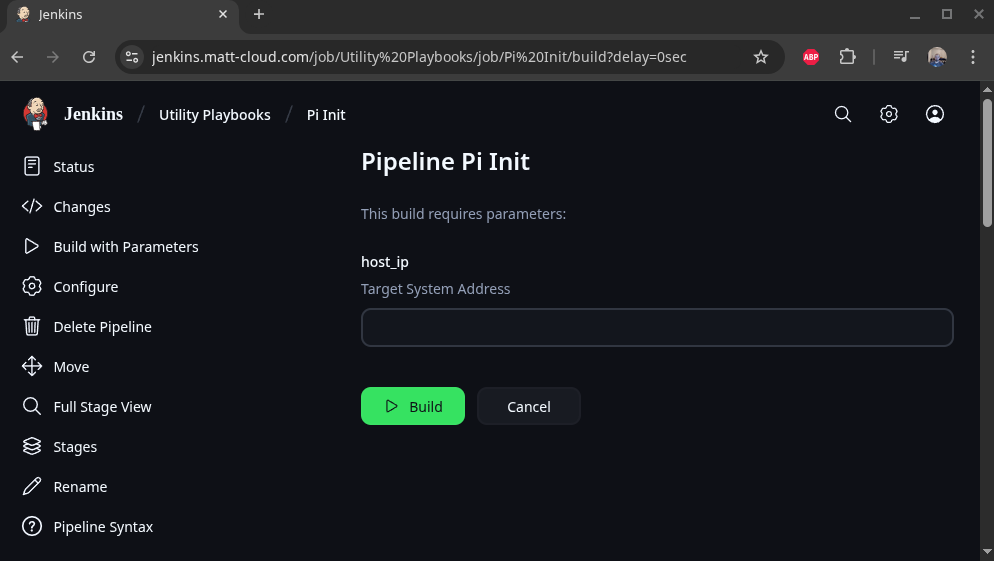
This is how to configure this to pull from Github:



No comments to display
No comments to display