
Ansible Basics
Ansible Overview
Ansible runs Playbooks, which are either simple lists of Tasks or lists of full Roles, which themselves are sets of Task lists. The different tasks that are available are all documented online, and are of such variety that you can do just about anything with them. The Tasks are configured with YAML which makes them easy to read. Variables are configured with Jinja formatting, and the output of tasks can be stored as variables. Variables can also be passed from the command and the inventory file.
Since Ansible is a program, it needs to be installed, and it needs to run in a compatible environment. In larger deployments Ansible might be called from within its own Docker container, but since Matt-Cloud is small, I just customize my Jenkins container to install the latest Ansible build as well as several plugins. This means that the ansible-playbook command is running inside my Jenkins Docker container. I mentioned this in an earlier page and included the Dockerfile for my Jenkins.
In the Making a Pipeline page example, the pi-init.yaml playbook is a very simple list of Tasks. A more complex but still simple list of tasks is a playbook I have for uprgading Debian Bookworm to Trixie. This Playbook doesn't require any Files or Templates or Variables, so it works just fine with being a simple list of Tasks.
trixie_upgrade.yaml
---

# lifted from here
# https://gist.github.com/yorickdowne/3cecc7b424ce241b173510e36754af47

- name: Trixie Upgrade Pipeline
  hosts: all
  become: yes

  tasks:

  - name: Get distribution version
    setup:
      filter: ansible_distribution*

  - name: Skip if not Debian 12
    meta: end_host
    when: ansible_distribution != 'Debian' or ansible_distribution_major_version != '12'

  - name: apt clean
    apt:
      clean: yes

  - name: Get filesystem facts
    setup:
      filter: ansible_mounts

  - name: Fail if free space on / is below 5 GiB
    ansible.builtin.assert:
      that:
        - item.size_available > (5 * 1024 * 1024 * 1024)
      fail_msg: "Free disk space on {{ item.mount }} is below 5 GiB"
    loop: "{{ ansible_mounts }}"
    when: item.mount == "/"

  - name: Perform apt upgrade
    apt:
      upgrade: dist
      update_cache: yes

  - name: Perform apt autoremove
    apt:
      autoremove: yes

  - name: Perform apt clean
    apt:
      clean: yes

  - name: Check if reboot required
    ansible.builtin.stat:
      path: /run/reboot-required
      get_checksum: no
    register: reboot_required_file

  - name: Reboot if required
    ansible.builtin.reboot:
      msg: "Reboot initiated by Ansible"
      connect_timeout: 5
      reboot_timeout: 600
      pre_reboot_delay: 0
      post_reboot_delay: 60
      test_command: whoami
    when: reboot_required_file.stat.exists

  - name: Update OS in sources.list
    ansible.builtin.replace:
      path: /etc/apt/sources.list
      regexp: 'bookworm'
      replace: 'trixie'

  - name: Find all 3rd-party repos
    ansible.builtin.find:
      paths: /etc/apt/sources.list.d
      patterns: '*'
      recurse: no
    register: third_party_repos

  - name: Switch 3rd-party repos from bookworm to trixie
    ansible.builtin.replace:
      path: "{{ item.path }}"
      regexp: 'bookworm'
      replace: 'trixie'
    loop: "{{ third_party_repos.files }}"
    loop_control:
      label: "{{ item.path }}"

  - name: Perform apt upgrade, moving to Trixie
    apt:
      upgrade: dist
      update_cache: yes

  - name: Get distribution version
    setup:
      filter: ansible_distribution*

  - name: Fail if not Debian 13
    assert:
      that:
        - ansible_distribution_major_version == '13'
      fail_msg: "Upgrade to Debian 13 failed"

  - name: Perform apt autoremove
    apt:
      autoremove: yes

  - name: Perform apt clean
    apt:
      clean: yes

  - name: Reboot to trixie
    ansible.builtin.reboot:
      msg: "Reboot initiated by Ansible"
      connect_timeout: 5
      reboot_timeout: 600
      pre_reboot_delay: 0
      post_reboot_delay: 60
      test_command: whoami

  - name: Modernize apt sources
    ansible.builtin.command:
      cmd: apt -y modernize-sources

...
A role-based Playbook looks simpler, but that simplicity hides a lot of complexity and modularity behind it. As an example, here is the cosmos-server playbook. It runs four Roles, and then two more Tasks, one of which loads a fifth Role. Because of the file structure of Ansible, I don't need to put the full paths to all these files. You can also find these files in my gitea; cosmos-server.yaml and Jenkinsfile.cosmos-server.
cosmos-server.yaml
---
- name: Cosmos Server Pipeline
  hosts: all
  become: yes
  vars:
    # this is for the pxe-server special role
    iso_only: true

  roles:
    - role: cosmos_init
      when: not refresh_special | bool

    - role: docker_workstation
      when: install_docker | bool and not refresh_special | bool

    - role: nvidia_drivers
      when: install_nvidia | bool  and not refresh_special | bool and not skip_nvidia | bool

    - role: ldap_client
      when: install_LDAP | bool  and not refresh_special | bool

  tasks:

    - name: display special_server
      debug:
        msg: "{{ special_server }}"

    - name: Run the appropriate role based on server type
      include_role:
        name: "{{ special_server }}"
      when: '"none" not in special_server'

...
Jenkinsfile.cosmos-server
pipeline {
    agent any

    // Define parameters
    parameters {
        string(name: 'host_ip', description: 'Target System Address')
        string(name: 'new_hostname', description: 'Update Hostname')
        booleanParam(name: 'rename_endpoint', defaultValue: true, description: 'Uncheck to skip renaming of endpoint')
        booleanParam(name: 'add_domain', defaultValue: true, description: 'When checked hostname will have home.cosmos appended')
        // reference for later
        // choice(name: 'DEPLOY_ENV', choices: ['dev', 'staging', 'prod'], description: 'Environment to deploy to')
        booleanParam(name: 'install_docker', defaultValue: true, description: 'When checked docker packages are installed and portainer started on 9100')
        booleanParam(name: 'install_LDAP', defaultValue: false, description: 'When checked LDAP integration is installed with NSLCD')
        // this now needs to have the case sensitive name of the role to run
        choice(name: 'special_server', choices: ['none', 'octoprint', 'kodi', 'timelapse', 'pxe_server', 'jenkins_vpn', 'net_bridge', 'carputer', 'video_capture'], description: 'Choose special server install if desired')
        booleanParam(name: 'refresh_special', defaultValue: false, description: 'When checked only the special server step is run')
        booleanParam(name: 'no_vpn', defaultValue: false, description: 'Check this option to remove default cosmos VPN')
        booleanParam(name: 'public_deploy', defaultValue: true, description: 'Uncheck this option to deploy private SSH key')
        booleanParam(name: 'onboard_pi', defaultValue: false, description: 'Check this option to onboard a new FriendlyElec Device')
        booleanParam(name: 'install_python', defaultValue: false, description: 'Check this option to install python packages')
        booleanParam(name: 'skip_nvidia', defaultValue: false, description: 'Check this option to skip nvidia driver install')
    }

    environment {
        ANSIBLE_FORCE_COLOR = '1'
        SATURN_BEHEMOTH = credentials('SATURN_BEHEMOTH')
        APPS_LIST = 'cosmos-base'
        LINUX_LDAP_PWD = credentials('LINUX_LDAP')
        pxe_proxy_password = credentials('pxe_proxy_password')
        PXE_API_KEY = credentials('PXE_API_KEY')
        matt_public_key = credentials('matt_public_key')
        matt_private_key = credentials('matt_private_key')
        cosmos_password = credentials('cosmos_password')
        cosmos_root_password = credentials('cosmos_root_password')
        jenkins_public_key = credentials('jenkins_public_key')
        tesla_api_key = credentials('tesla_api_key')
    }

    options {
        ansiColor('xterm')
    }

    stages {

        stage('Inject Auth Key') {
            when {
              expression { params.onboard_pi }
            }
            steps {
                script{
                    // clear ssh keys
                    echo "Target IP: ${params.host_ip}"

                    sh """
                    ssh-keygen -f "/root/.ssh/known_hosts" -R "${params.host_ip}"
                    """

                }

                script{
                    sh """
                    echo Copy public key to pi home dir
                    sshpass -p 'pi' ssh -o StrictHostKeyChecking=no pi@${params.host_ip} "echo ${env.jenkins_public_key} > /home/pi/authorized_keys"

                    """
                }

                script{
                    sh """
                    echo Make sure /root/.ssh exists
                    sshpass -p 'pi' ssh -o StrictHostKeyChecking=no pi@${params.host_ip} "echo pi | sudo -S mkdir -p /root/.ssh/"
                                        """
                }

                script{
                    sh """
                    echo Move public key to root
                    sshpass -p 'pi' ssh -o StrictHostKeyChecking=no pi@${params.host_ip} "echo pi | sudo -S mv /home/pi/authorized_keys /root/.ssh/authorized_keys"

                    """
                }

                script{
                    sh """
                    echo Restrict permissions on file
                    sshpass -p 'pi' ssh -o StrictHostKeyChecking=no pi@${params.host_ip} "echo pi | sudo -S chmod -R 600 /root/.ssh/"

                    """
                }

                script{
                    sh """
                    echo Set owner to root
                    sshpass -p 'pi' ssh -o StrictHostKeyChecking=no pi@${params.host_ip} "echo pi | sudo -S chown -R root:root /root/.ssh/"

                    """
                }
            }
        }


        stage('Generate Inventory File') {
            steps {
                // Generate the dynamic inventory file
                sh """
                cd /var/jenkins_home/ansible
                chmod +x /var/jenkins_home/ansible/inventory/inventory.sh
                /var/jenkins_home/ansible/inventory/inventory.sh ${params.host_ip}

                """
            }
        }

        stage('Ansible Playbook') {
            steps {
                //Run the cosmos-base ansible playbook
                // /workspace/ansible/playbooks/cosmos-base.yaml
                sh """
                echo ${params.host_ip}
                hash=\$(echo -n ${params.host_ip} | md5sum | cut -c 1-8)
                inventory_file="/var/jenkins_home/ansible/.inv/inventory-\$hash.yml"

                cd /var/jenkins_home/ansible

                ansible-playbook -i \$inventory_file \
                    /var/jenkins_home/ansible/playbooks/cosmos-server.yaml --ssh-common-args='-o StrictHostKeyChecking=no' \
                    --extra-vars "new_hostname=${params.new_hostname} saturn_behemoth=${SATURN_BEHEMOTH} \
                                  docker_full=false rename_host=${params.rename_endpoint} onboard_pi=${params.onboard_pi} \
                                  linux_ldap_pwd=${LINUX_LDAP_PWD} install_docker=${params.install_docker} \
                                  install_LDAP=${params.install_LDAP} special_server='${params.special_server}' \
                                  refresh_special=${params.refresh_special} pxe_proxy_password=${pxe_proxy_password} \
                                  PXE_API_KEY=${PXE_API_KEY} no_vpn=${params.no_vpn} add_domain=${params.add_domain} \
                                  matt_public_key='${env.matt_public_key}' matt_private_key='${env.matt_private_key}' \
                                  cosmos_password='${env.cosmos_password}' cosmos_root_password='${env.cosmos_root_password}' \
                                  tesla_api_key='${tesla_api_key}' public_deploy=${params.public_deploy} \
                                  install_python=${params.install_python} skip_nvidia=${params.skip_nvidia} "

                """
            }
        }
    }

    post {
        always {
            // Remove dynamic Inventory file
            sh """
            hash=\$(echo -n "${params.host_ip}" | md5sum | cut -c 1-8)
            inventory_file="/var/jenkins_home/ansible/.inv/inventory-\$hash.yml"
            rm \$inventory_file

            """
        }
    }

}
I have put a lot of my Ansible code up on my Personal Github, so I'll share some links here. Most of my Github is public, but if you can read this you can also probably SSO into my Github.
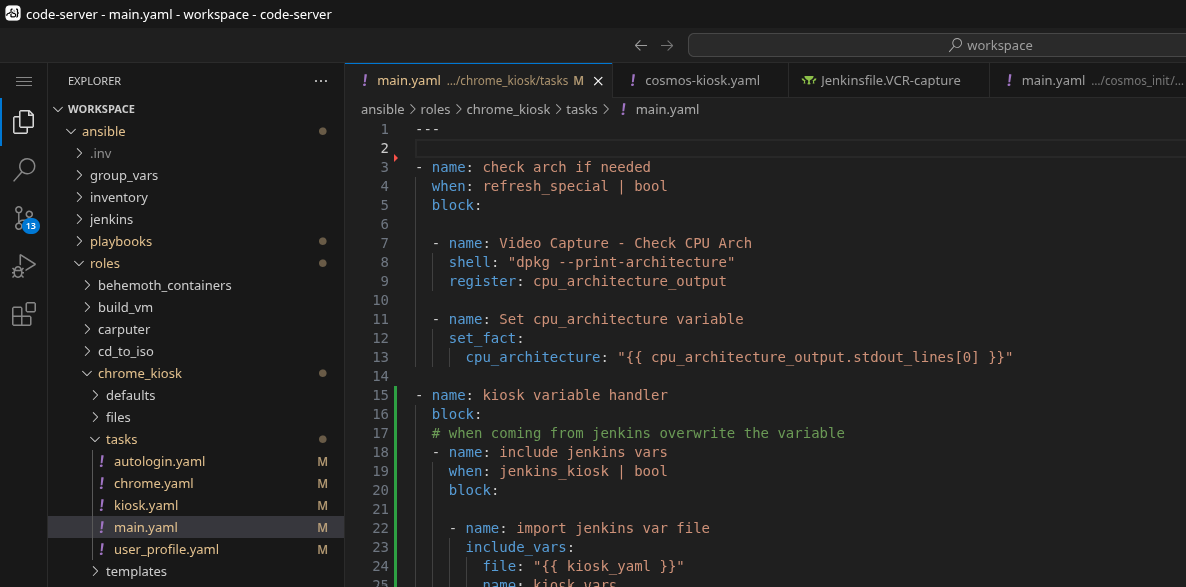
The end result of how I set up my own Ansible structure and the docker containers I run is that I get a SSO-protected VS Code instance in the browser with all my stuff in it. The container is even smart enough to know about the Github changes, thus the amber highlighting on the filenames in the tree. Note the file structure here; the jenkins and playbooks folders are the source of the two complimentary named Github repos above.
Inventory File?
Ansible requires an inventory file. This is a consequence of how any why Ansible was designed. Ansible was intended to have a single inventory file and a control node, and the control node would periodically run playbooks agains hosts from the inventory file. We don't do that here. Instead of a control node, I have Jenkins initiate an Ansible playbook by dynamically creating an inventory file. Ansible is a command that is run with an argument for the playbook file and the inventory file. Since I don't maintain an inventory file, this needs to be dynamically generated on the fly. It bears mentioning that the inventory file is, in fact, a file that is stored on my Jenkins server and has to be deleted, which is the last thing the Jenkinsfile does. Since I run all my playbooks from within the Jenkins server, that means the inventory files are stored here while the playbooks run, and then deleted when finished. I can also use the inventory file to pass certain variables from Jenkins, though I also do this with the ansible-playbook command.
No comments to display
No comments to display